


Power BI Desktop Bridge and Authoring MCP: How the Agent Loop Works
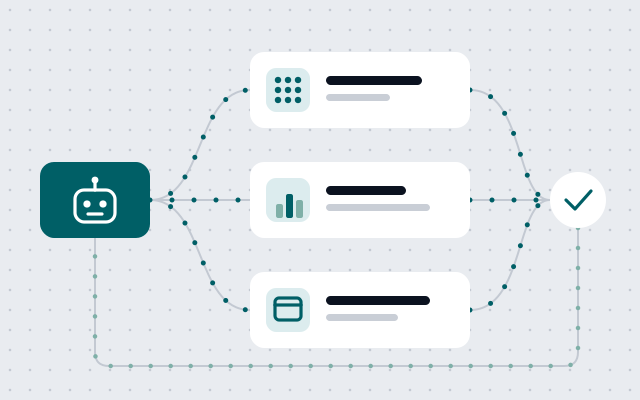
Power BI's agent tooling is three parts: an MCP server for the model, PBIR files for the report, and a Desktop Bridge to check the result. A map.
Contents7 sections
"The Power BI bridge MCP" is a phrase that keeps turning up in conversations about agent-built reports, and it describes something that does not exist. There is a Power BI Authoring MCP server, and there is a Power BI Desktop Bridge. They are separate tools, they speak different protocols, they touch different layers of a report, and an administrator switches them off in different places.
The distinction stopped being academic with the September 2026 Power BI release, in which Microsoft moved its agentic authoring experiences to general availability and added a hosted version of the MCP server. If your team is about to let an agent near a semantic model, it helps to know which piece does what.
Three tools, three layers
| Layer | Tool | How the agent talks to it | Where it runs |
|---|---|---|---|
| Semantic model: tables, measures, relationships, roles | Power BI Authoring MCP server | MCP tools | Your machine (local) or Microsoft-hosted |
| Report: pages, visuals, filters, themes | Report Authoring skill editing PBIR files | Plain JSON files on disk | Your machine |
| Verification: reload and screenshots | Power BI Desktop Bridge and its CLI | JSON-RPC over a local named pipe | Inside the Power BI Desktop process |
The MCP server is the hands on the model. The skill is instructions plus file edits for the report layer. The Bridge is the eyes: it lets the agent reload what it changed and look at the rendered page. Microsoft's documentation makes the same split and adds a line worth repeating to anyone who expects magic from installing a server: the tools are the what, the skills are the how.
The Authoring MCP server: local or hosted
The Authoring MCP server gives an agent tools to create and change semantic model objects: tables, columns, measures, relationships, hierarchies, calculation groups, perspectives, partitions and security roles. It can also run DAX queries to test what it wrote. It performs modeling operations only, so report pages are out of its reach by design.
One server, two deployments. The local one has been generally available since November 2025 and runs on your machine over stdio. The hosted one arrived in preview with the September release, at a Microsoft endpoint, with nothing to install.
| Capability | Hosted (preview) | Local (GA) |
|---|---|---|
| Installation | None | VS Code extension, npm package or executable |
| Authentication | Microsoft Entra ID, as the signed-in user | Entra interactive sign-in or service principal |
| Models in a Fabric workspace | Yes | Yes |
| Models open in Power BI Desktop | No | Yes |
| PBIP and TMDL files on disk | No | Yes |
| Transactions | No | Yes |
| macOS | Yes | No |
Registration is a few lines in the MCP client's configuration, following the pattern in the documentation:
{
  "servers": {
    "powerbi-authoring-local": {
      "type": "stdio",
      "command": "npx",
      "args": ["-y", "@microsoft/powerbi-modeling-mcp@latest", "--start"]
    }
  }
}
The hosted variant swaps this for an HTTP entry that points at https://api.fabric.microsoft.com/v1/mcp/powerbi/authoring. Microsoft recommends the hosted server whenever you work only against models in Fabric workspaces, and the local one when Power BI Desktop or project files are involved. It also warns against registering both at once, because the agent then sees two overlapping tool sets, routes ambiguously and burns extra tokens on every request.
The Bridge is a pipe on your machine
The Desktop Bridge is a small server that runs inside the Power BI Desktop process and listens on a named pipe called pbi-desktop-bridge-{processId}. It speaks JSON-RPC 2.0, remote access is not supported, and every open Desktop window gets its own pipe. Multiple clients can connect, but only one operation runs at a time.
Its surface is deliberately tiny. Four methods are documented: one returns the manifest of available methods, one reports which file is open and whether it has unsaved changes, one captures a PNG screenshot of a report page, and one reloads the open project from disk (with or without re-applying the model definition). Nothing in that list reads data, changes a measure or publishes anything.
Most people will meet the Bridge through its CLI, which wraps those methods in commands an agent can call:
# Which Desktop instances are running, what file is open, any unsaved changes?
powerbi-desktop status

# The agent has edited PBIR files on disk; load them into the running Desktop.
powerbi-desktop reload

# Capture one page as a PNG so the agent can inspect what actually rendered.
powerbi-desktop screenshot <page-id>
There are also open, manifest and screenshot-all commands. That is the entire toolset, and its narrowness is what makes it easy to reason about.
One loop, five steps
Put together, the documented flow runs like this. The agent uses the MCP server to make sure the model has the tables and measures the report needs. It edits PBIR files for pages and visuals. It runs a validation step to catch structural problems. It calls the Bridge to reload Desktop and take screenshots. Then it reviews the result and repeats until validation and the visual check both pass.
The fourth step is the one that changed the quality of agent-built reports, because before it the agent was writing JSON blind. A visual bound to a field that does not exist is valid JSON and a broken report. With a screenshot in the loop, the agent can see the error icon and fix the binding. For remote report editing, the September release adds browser-based validation through a headless browser, which removes the Desktop dependency and opens the loop to Mac users.
A caution from an earlier look at this tooling still holds, though. A screenshot proves the page rendered. It does not prove the number on the card is right, and a finance report is judged on the number.
What an administrator can switch off
Each piece has its own control, and they are not where you might look first.
- Hosted MCP server. A Fabric tenant setting, "Users can use the Power BI Model Context Protocol server endpoint", has to be enabled before anyone can sign in.
- Local MCP server. No tenant setting blocks it. It connects through the XMLA endpoint, so the only way to stop it is to disable XMLA, which also stops every other tool that depends on it. In practice the control is the permission model: an agent with Build permission can only query, and it needs Write to change anything.
- Desktop Bridge. A setting in Power BI Desktop under Options, Security, which is on by default. For managed devices there is a registry policy: the value
DesktopNamedPipeBridgeunderHKEY_LOCAL_MACHINE\SOFTWARE\Policies\Microsoft\Power BI Desktop, set to 0 to disable and 1 to enable. - AI access to a specific model. A new per-model setting lets editors block read-only users from reaching a semantic model through Copilot and Microsoft's remote MCP tools. It ships enabled, preserving current behaviour.
The second item deserves a pause. A developer with Write permission on a production model and a local MCP server can let an agent change that model today, and no tenant switch prevents it. The guardrail is who holds Write, which was always the guardrail; the difference is the speed at which a mistake can now be made across hundreds of objects.
Where it will trip you
A handful of documented behaviours are worth knowing before the first session. The general-availability label covers the agentic experience as a whole, while the Report Authoring skill's own documentation page still marks it as preview, so check the status of each piece you depend on. The PBIR files are the source of truth, so if you have unsaved changes in Desktop and ask the agent to iterate, it works from the files on disk and your unsaved edits are not included. The status command reports unsaved changes for exactly this reason. DAX queries through the server stop at 100,000 rows. The hosted server keeps your model connection in a session, and a client that does not return the session header will reconnect before every operation. Some MCP clients rely on dynamic OAuth client registration, which Entra ID does not support, so they cannot use the hosted server without a manually registered app.
And one point that belongs in a data-protection conversation, not a technical one: model metadata and query results flow into the conversation, which means they reach whichever LLM provider the MCP client uses.
A rollout that respects the model
Microsoft's own safety advice is short: back up the model, work in PBIP files under Git, and be mindful of what reaches the LLM provider. Power BI Projects reached general availability in the same release, with PBIR now the default report format, so there is little reason left to run this against a binary PBIX.
Most of my current work sits on Fabric with CI/CD for BI assets, and Claude Code with MCP is part of the daily toolkit, so the pattern I would defend is the boring one. Commit a baseline before the agent starts. Let it work in a branch against a development workspace. Read the diff of the TMDL the way you would read any pull request, with particular suspicion for measures and security roles. Check a handful of figures against a known total before anything is merged. Give Write on production models to a pipeline identity, and keep it away from individual laptops.
Microsoft's Power BI September 2026 Feature Summary covers the release, and the Microsoft Learn pages for the Desktop Bridge and the Authoring MCP server hold the method reference and the full list of limitations.
Facing a similar challenge?
A free 30-minute call.
Related articles
All articles →
Agent-Authored Power BI Reports: What to Delegate, What to Guard
Power BI's new agent skills write PBIR files, reload Desktop and iterate from screenshots. Where the delegation line sits for a finance BI team.
Copilot-Ready Power BI: Why DAX UDFs Now Matter
M365 Copilot now writes DAX against your semantic model. Table-valued DAX UDFs, documented in AI Instructions, are what keep its answers consistent.
When the Agent Builds the Model: Governing Agentic Analytics in Power BI and Fabric
Agent Skills and Fabric Apps turn models, reports and apps into agent-written code. What ties out, who reviews the diff, and who owns the app.